

LEDEdit 2025 software is a game changer in the world of LED light display programming. This powerful tool has been designed to help professionals and enthusiasts alike to create dynamic, visually appealing LED displays effortlessly. Whether you are planning a grand light show for a public event or setting up unique decorations for a special occasion, LEDEdit makes the process both intuitive and customizable.
One of the standout feature’s of LEDEdit 2025 is its user-friendly interface. Even beginners can navigate through its extensive tools and libraries without feeling over whelmed. From importing LED layouts to syncing intricate animations with music, the software opens up endless possibilities for creativity. Advanced users will also appreciate its support for multiple LED controller protocols, ensuring seamless integration with a wide range of hardware.
What sets LEDEdit apart is its capability to bring imagination to life. Users can design complex patterns, color transitions, and effects in just a few clicks. Additionally, the software’s versatility allows it to be used for projects ranging from commercial advertising displays to artistic light installations.
In this article lets find out the new features of LEDEdit 2025 (V10.1) software and how to install in your system.
LEDEdit 2025 (v10.1) New features .
- Fixed software bugs of previous version .
- More supported pixel LED controllers and pixel LED drive chips .
- Extend IP feature.
- S Serial.
- Improved DMX Madrix control.
- Point by Point correction feature .
- More Export Options.
How to install LEDEdit software.
LEDEdit only supports Windows operating systems. Checkout This Article on how to install LEDEdit software on windows.
Updating LEDEdit software
Although , It’s easy to update the LEDEdit software we highly recommend keeping the current version if it still supports the pixel led controllers that you are working with. In case you decided to update Here is how to do it.
Update during an installation :
- Follow the steps mentioned in This Article on how to install LEDEdit software.
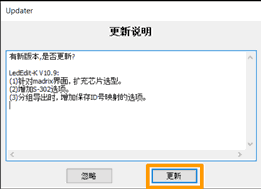
- At the end of the installation of LEDEdit you will be greeted with this pop-up .
- Choose the highlighted button to update or wait until the countdown timer end this will automatically update the software with this window.
Update after an installation :
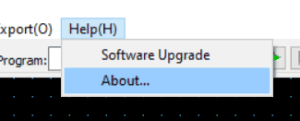
- Open the LEDEdit software.
Updating LEDEdit 2025
- Click on the Help button at the to right corner.
- Click on Software Update .
Update Window LEDEdit 2025
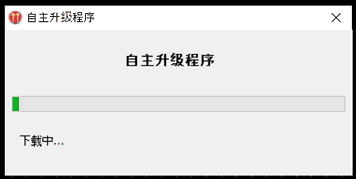
updating window will appear Click on the highlighted button and starts updating the software. “After the update it will ask do you want to restart the application?” .Click on “Yes” button.